A built-in Samsung wall oven runs hotter and more often than most kitchen appliances, and that repeated heat cycling is exactly what wears down sensors, seals, and igniters over time. A little routine attention keeps baking consistent and prevents the error codes that come from buildup rather than actual part failure.
Clean the cavity regularly, not just when it’s visibly dirty
Grease and food residue that bake onto the oven walls don’t just look bad — they can interfere with the temperature sensor’s readings and, over time, contribute to smoke or uneven heat during high-temperature cooking like broiling. If your oven has a self-clean or steam-clean cycle, use it every few months depending on how often you cook. Wipe up spills after they cool rather than letting them accumulate through several cooking sessions.
Keep the vent unobstructed
The oven’s vent, usually near the back of the cavity or beneath the control panel, needs to stay clear for heat and moisture to escape properly. A blocked vent from grease buildup can cause the oven to run hotter than the set temperature and is a common contributor to a C-24 fast-temperature-rise problem. Include it in your regular cleaning routine.
Never line the oven floor with foil
This is one of the most common causes of premature oven damage. Foil on the cavity floor traps heat against the surface, can warp or discolor it, and blocks the airflow the temperature sensor depends on for accurate readings. If you’re worried about drips, use a rack-positioned drip tray instead — never anything placed directly on the oven floor.
Check the door seal
The gasket around the oven door keeps heat inside the cavity where it belongs. A worn or torn seal lets heat escape, which forces the oven to run longer to reach and hold temperature and can throw off baking results even when the sensor itself is working fine. Inspect it periodically for cracking, and make sure the door is closing and latching fully — sticking latches are a common cause of door-related error codes.
Wipe the control panel carefully
Grease and moisture that work their way under the control panel buttons over months of cooking are a frequent cause of stuck-button problems. Clean the panel with a soft, lightly damp cloth rather than spraying cleaner directly onto it, and avoid letting steam from nearby cooking linger against the panel surface.
Recalibrate if baking results drift
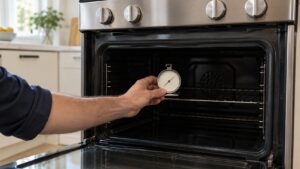
If your oven has been consistently running a little hot or cold, most Samsung wall ovens include a temperature offset adjustment in the settings menu that corrects for it without needing a service call. This is worth checking before assuming the sensor has failed, especially if the oven is otherwise operating normally with no error code displayed.
Use oven-safe bakeware and avoid overcrowding
Placing cookware directly against the cavity walls or overcrowding multiple racks blocks the airflow the oven relies on for even heat distribution, which can cause some dishes to bake faster than others even when the oven itself is working correctly. Leave space between pans and the walls, and stagger items across racks rather than centering everything on one level, particularly during longer bakes where consistent airflow matters most.
When it’s more than upkeep
Routine cleaning prevents a lot of oven problems, but it won’t fix a genuinely failed sensor, door switch, or control board. If you’ve handled the basics and you’re still seeing an error code or inconsistent baking, it’s time for an inspection. Our oven repair service can find the actual cause, and Samsung’s care guidance is available at Samsung Support.
This guide is provided by an independent appliance repair company and is not affiliated with, endorsed by, or sponsored by Samsung Electronics.